Week 14: Model Building
Date: November 24, 2025
Today…
Starting from scratch & building your results
Final Project Check in
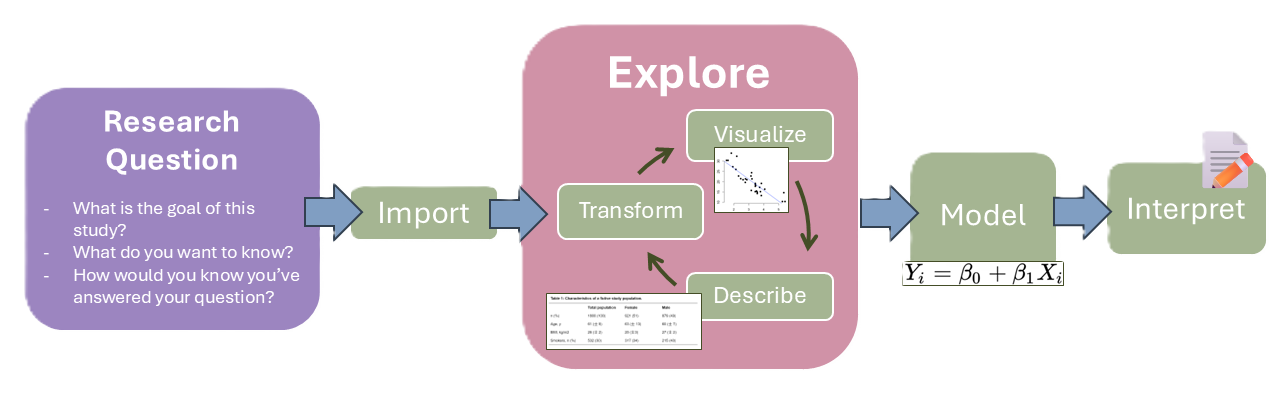
Research Process Overview
The Adolescent Sleep & Affect Project (ASAP)
First, we need to familiarize ourselves with the variables that are present in the data
The Dataset:
N = 400 children followed annually for 3 years.
3 Timepoints: Baseline (ages 7-9), T2 (8-10), and T3 (9-11)
Key Measures:
Psychopathology: Depression (
Dep), Anxiety (Anx)Sleep: Sleep Duration (
SleepDur), Sleep Quality (SleepQual)Stress: Peer Stress (
PeerStress), Academic Stress (AcadStress)Development: Puberty (
Pubertyon 0-8 scale), Age (Age)
Rows: 400
Columns: 27
$ ID            <int> 1, 2, 3, 4, 5, 6, 7, 8, 9, 10, 11, 12, 13, 14, 15, 16, 1…
$ Sex           <int> 1, 0, 1, 0, 1, 1, 1, 0, 1, 1, 0, 1, 1, 0, 0, 1, 0, 0, 1,…
$ SES           <dbl> -0.20, -2.85, -0.71, -0.09, -0.17, -1.02, -1.82, 1.23, -…
$ T1_Age        <dbl> 7.57, 8.77, 7.19, 9.67, 9.46, 9.68, 9.87, 9.05, 9.21, 9.…
$ T1_Puberty    <dbl> 3.00, 3.79, 4.04, 4.86, 5.66, 4.51, 4.69, 4.59, 4.97, 4.…
$ T1_SleepDur   <dbl> 9.85, 9.57, 8.61, 9.26, 8.63, 9.02, 10.05, 8.84, 10.48, …
$ T1_SleepQual  <dbl> 6.57, 5.61, 4.22, 4.58, 4.81, 5.25, 4.43, 4.38, 4.46, 5.…
$ T1_PeerStress <dbl> 12.20, 9.85, 5.03, 8.02, 4.00, 7.68, 5.11, 11.67, 8.07, …
$ T1_AcadStress <dbl> 4.19, 8.18, 7.44, 6.87, 5.92, 6.43, 5.21, 4.93, 6.14, 2.…
$ T1_Dep        <dbl> 10.43, 8.89, 5.49, 8.49, 10.98, 8.58, 12.09, 11.89, 12.1…
$ T1_Anx        <dbl> 4.07, 4.65, 4.17, 3.73, 6.77, 5.12, 4.52, 5.90, 1.88, 8.…
$ T2_Age        <dbl> 8.57, 9.77, 8.19, NA, 10.46, 10.68, 10.87, 10.05, 10.21,…
$ T2_Puberty    <dbl> 4.17, 4.94, 4.94, NA, 6.66, 5.39, 5.92, 5.34, 6.17, 5.96…
$ T2_SleepDur   <dbl> 8.54, 9.38, 8.11, NA, 8.77, 7.22, 9.32, 7.55, 9.94, 8.10…
$ T2_SleepQual  <dbl> 6.03, 5.14, 2.64, NA, 4.64, 7.15, 5.03, 6.07, 5.45, 3.89…
$ T2_PeerStress <dbl> 10.82, 11.77, 10.59, NA, 8.62, 13.33, 8.31, 13.33, 11.22…
$ T2_AcadStress <dbl> 3.82, 5.71, 8.23, NA, 6.26, 4.10, 7.05, 6.32, 5.81, 6.22…
$ T2_Dep        <dbl> 12.14, 9.35, 8.29, NA, 10.66, 10.04, 13.96, 11.72, 11.55…
$ T2_Anx        <dbl> 3.84, 3.61, 1.61, NA, 10.24, 8.02, 3.30, 7.33, 5.52, 11.…
$ T3_Age        <dbl> 9.57, 10.77, NA, NA, 11.46, 11.68, NA, 11.05, 11.21, NA,…
$ T3_Puberty    <dbl> 5.05, 6.37, NA, NA, 7.42, 6.69, NA, 6.48, 7.49, NA, NA, …
$ T3_SleepDur   <dbl> 7.52, 7.44, NA, NA, 8.15, 6.96, NA, 7.52, 6.66, NA, NA, …
$ T3_SleepQual  <dbl> 5.60, 3.75, NA, NA, 4.88, 4.58, NA, 5.30, 2.74, NA, NA, …
$ T3_PeerStress <dbl> 8.62, 9.49, NA, NA, 10.00, 10.14, NA, 10.43, 7.29, NA, N…
$ T3_AcadStress <dbl> 4.17, 4.41, NA, NA, 6.15, 5.97, NA, 6.59, 6.20, NA, NA, …
$ T3_Dep        <dbl> 13.53, 14.60, NA, NA, 9.52, 20.08, NA, 22.65, 17.87, NA,…
$ T3_Anx        <dbl> 3.09, 4.94, NA, NA, 10.72, 12.14, NA, 4.03, 2.82, NA, NA…
Part 1a: Define Research Question
These variables are fairly intuitive, so you don’t have to be an expert in this area to think about a research question. Take a moment and review the data dictionary (Week 14 page) and think about what questions seem interesting to you.
If you have any empirical questions about the data or this area, please ask Dr. Haraden (he is an “expert”) for clarification.
Record your research question on the handout that has been provided. Include the variables that you think you can use to answer your question.
Part 1b: Refine Research Question
Share your research question with your partner. Identify your variables of interest. Work together to identify a potential analytic model that you can use.
As the consultant, be sure to ask about the model and how it is going to be answering their question as well as seeing if there are alternative explanations for their “narrative”.
Part 2: Method Selection
You will now need to identify the specific statistical model that you are planning on using to address your question
Start by drawing your model (remember the boxes and arrows) to get an idea of how you are thinking about it. Ask yourself “Which variable influences this one?”
Specify your variables from the dataset and align them with the model you have.
Part 3: Analysis Plan
Write out some pseudo-code to help you out when we move to using R
✨Congratulations ✨
You just made your data analytic plan!
Every paper should have a section that goes into detail about the steps they are going to go through. This helps to give readers a framework on what to expect.
Building the Results Section
Now that we have a clearly defined our research question, we can begin the process of working with the data!
Here are the steps that I tend to follow:
- Wrangle 🤠 and tidy the data
- Describe my data (Cronbach \(\alpha\), correlations, means & sds)
- Visualize 📈
- Building my Model 🚧
- Interpreting and Reporting 📓
Building the Results Section
From our data analytic plan, we have a general idea on how to build our model 👷♀️
But that is all the way at step #4
We need to construct the foundation and provide the reader with the necessary information to be able to properly interpret your results
Baking the Results Section 🧑🍳
Data Analytic Plan = Recipe
- Giving the overview of the plan and what to expect
Descriptives & “Table 1” = Your specific ingredients
- The reader is able to see your ingredients and know they can “trust” your results
Building the Models = Putting everything together and baking
- You go through the steps in order and put it in the oven
Discussion = Icing and Finishing touches
- Comparing to the other cakes and highlight where you can improve when you bake it again
Constructing the Results Section
Getting away from baking, let’s say you are building something (LEGO?), or remodeling.
Results Part 1 (Descriptives) is the “Inventory & Site Survey”
- Before you build a house, you must check the materials. Do you have enough bricks (N)? Are any bricks broken (missing data)? Is the land/foundation flat or weirdly shaped (normality/outliers)?
Note
We cannot build a stable house if we don’t admit that 10% of our wood is rotten. Descriptives are just us checking the pile of lumber to make sure it’s safe to build with.
Results Part 2 (Inference) is the “Construction & Stress Test”
- Now that we know the wood is good, we nail it together to see if it holds together
ASAP and Results
Now let’s use R to finish the steps and put together a results section!
- Wrangle 🤠 and tidy the data
- Describe my data (Cronbach \(\alpha\), correlations, means & sds)
- Visualize 📈
- Building my Model 🚧
- Interpreting and Reporting 📓